Exploration 3.1: Addition of Displacement Vectors
Please wait for the animation to completely load.
Suppose that you use a radar system to track an airplane (the red circle) and the airplane travels according
to the animation shown. Restart.
- Draw a vector for the displacement of the airplane from t = 0 s to t = 8 s.
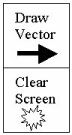
To do this, click the "Draw Vector" button. When a vector appears, drag it to the
position of the airplane at t = 0 s. Then play the animation, stop it at t = 8 s, and adjust
the tip of the vector until it is at this position.
- Now draw a displacement vector for the airplane from t = 8 s to t = 16 s. Use the same procedure as before. Be sure to click the "Draw Vector" button so that you can have a new vector to work with.
You should see both the first displacement vector and the second displacement vector.
- Now draw a displacement vector for the airplane from t = 0 s to t = 16 s.
Use the same procedure as before. What do you notice? To add
vectors like this, you can connect the vectors from tail to head. The
result, called the resultant vector, is the vector drawn from the tail of the first vector
to the head of the last vector.
- Click here to view the correct
answer. How does your result compare to the correct answer?
Exploration authored by Aaron Titus with support by the National Science Foundation under
Grant No. DUE-9952323 and placed in the public domain.