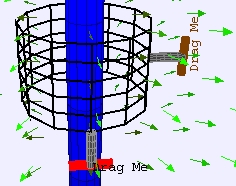
Gaussian surface around a long line of
charge.
Linear Charge Gauss's Law Model
The EJS Linear Charge Gauss
Law
model shows a Gaussian
surface and allows for the
measurement of the
charge enclosed and surface area of the surface. Users can change the
radius of the linear charge as well as the size of the Gaussian
surface. Users
can examine and edit
the model if Ejs is
installed.
Exercises:
- Run
the simulation. The long blue cylinder is a very long line of charge.
Change the height of the Gaussian surface by dragging the
red handle. How does the charge enclosed and surface area change as you
change the height of the Gaussian surface? Record some data for
different heights. Why doesn't the ratio of qenclosed/area change?
- Now, use the brown handle to
change the radius of the surface. Again, how does the charge enclosed
and surface area change as you change the radius? If the surface
remains outside the long cylinder? Explain. If the surface is within
the blue cylinder? Explain.
- Clear the data (button with
Eraser icon) and record data for charge enclosed and surface area for
different radii of the Gaussian surface (moving the handle). Collect
enough data so you can plot how the ratio of qenclosed/area
as a
function of the radius, r,
of the Gaussian surface. Determine electric field as a function of r
both inside and outside the blue cylinder. You can use the built-in Data
Tool by clicking on the Wrench
button. Some
notes on using DataTool:
- DataTool
automatically draws lines between nearby points and you may find this
confusing so you can click on the checkbox with a line through it to
remove the connecting lines.
- DataTool
can provide a Fit
to the data in the first two columns
only. You may need to drag the columns
around in order to fit data of interest.
- If you want DataTool
to Fit
the data to an equation not in the list, you will need to edit the
current equation in Fit
Builder. For example, if
you
want to fit the data to a/x3 (and have the program
automatically find the value of a),
double-clicking on the equation of the line (a*x+b) will
automatically open the Fit
Builder. In this case, since you only want to fit one parameter,
first delete parameter "b"
(from the parameter list) and then
type your new Function = a/x^3.
- For uniformly charged wire
(charges evenly distributed throughout) of radius R, the electric field
as a function of radius is given by
E ∝ r
for r<R (inside wire)
E ∝ 1/r for r>R
(outside
wire)
but
this simulation does not
give this result. What is different?
- Advanced:
This model does not model a uniformly charged wire, instead the charge
is distributed unevenly (along the radius) in the wire. What is
the
charge distribution?
- If you have EJS
installed, change the model
so that it models a charge distributed evenly in the wire.
You will need to go to Model->Fixed
Relations. Describe how you
changed it and record the data from your edited model.
References:
- Giancoli, Physics
for Scientists and Engineers,
4th
edition, Chapter 21
(2008).
Credits:
The Coulomb Force Wrong Model
was
created by Anne Cox, Wolfgang Christian,and Francisco
Esquembre using the Easy Java Simulations (EJS) authoring and
modeling
tool. Exercises written by Anne J Cox.
You can examine and modify a
compiled EJS model if you run the
program by double clicking on the model's jar file.
Right-click
within the running program and select "Open EJS Model" from the pop-up
menu to copy the model's XML description into EJS. You must,
of
course, have EJS installed on your computer.
Information about EJS is
available at: <http://www.um.es/fem/Ejs/>
and in the OSP ComPADRE collection <http://www.compadre.org/OSP/>.