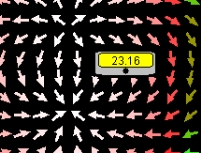
Screen shot of field vectors and a
detector.
Two Charges and Detector Model
The EJS Two Charges and
Detector
model shows the electric field of two charges and asks the student to
determine what the movable detector is measuring. A slider can change
the separation between the charges and the detector measurements can be
recorded and analyzed using a
built-in
data analysis tool. Users
can examine and edit
the model if Ejs is
installed.
Exercises:
- Run
the simulation and move the detector around an observe the
readings. You can see the field vectors and should be able to tell
where the two charges are located. Change the slider and observe what
happens. Describe the configuration.
- The detector measures either
the magnitude of the electric field or the absolute value of the
potential. Which is it? What is your evidence? You
may need to make some
measurements to help determine what is wrong. If so, click on the Record
button to record the values measured by the
detector in the Data
Table.
- Clicking on the Wrench
tool opens up DataTool,
a data analysis tool, with all of your recorded data in columns. Some
notes on using DataTool:
- DataTool
automatically draws lines between nearby points and you may find this
confusing so you can click on the checkbox with a line through it to
remove the connecting lines.
- DataTool
can provide a Fit
to the data in the first two columns. You may need to drag the columns
around in order to fit data of interest.
- If you want DataTool
to Fit
the data to an equation not in the list, you will need to edit the
current equation in Fit
Builder. For example, if
you
want to fit the data to a/x3 (and have the program
automatically find the value of a),
double-clicking on the equation of the line (a*x+b) will
automatically open the Fit
Builder. In this case, since you only want to fit one parameter,
first delete parameter "b"
(from the parameter list) and then
type your new Function = a/x^3.
- If you have EJS
installed, now that you have
determined what the detector measures (field or potential),
change it to measure the other value. You will need to go
to Model->Custom->Get
Detector Value to make the
changes. Describe how you changed it and how you verified your work.
(Background required: for
loops.)
References:
- Giancoli, Physics
for Scientists and Engineers,
4th
edition, Chapters 21 and 23
(2008).
Credits:
The Two Charges and Detector Model
was
created by Wolfgang Christian, Francisco Esquembre and Anne J
Cox
using the Easy Java Simulations (EJS) authoring and modeling
tool. Exercises written by Anne J Cox.
You can examine and modify a
compiled EJS model if you run the
program by double clicking on the model's jar file.
Right-click
within the running program and select "Open EJS Model" from the pop-up
menu to copy the model's XML description into EJS. You must,
of
course, have EJS installed on your computer.
Information about EJS is
available at: <http://www.um.es/fem/Ejs/>
and in the OSP ComPADRE collection <http://www.compadre.org/OSP/>.