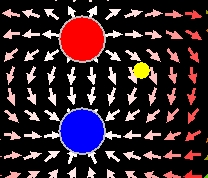
Screen shot of the
dipole and test charge.
Dipole Trajectory Wrong Model
The EJS Dipole Trajectory
Wrong
model shows the electric field generated by a dipole. A slider can
change
the separation between the charges. A test charge moves in the dipole
field, but its trajectory is incorrect. Users
can examine and correct the model if
Ejs is
installed.
Exercises:
- Run
the simulation and observe the dipole field due to fixed charges (red
and blue) . Also note the trajectory of the test charge.* You can move
the test charge anywhere on the screen (except on top of one of the
stationary charges). You can also change the separation between the two
fixed charges.
- What is wrong with this
simulation? What is your evidence?
- If you have EJS
installed, now that you have
determined what is wrong with the model, correct it. You will
need to go
to Model->Evolution
to make the
changes. Describe how you changed it and how you verified your work.
*Recall that a test charge
is defined to feel the effects of an external electric field, but not
change the field itself (therefore, there are no field vectors around
it).
References:
- Giancoli, Physics
for Scientists and Engineers,
4th
edition, Chapter
21
(2008).
Credits:
The Two Charges and Detector
Model
was
created by Anne J Cox, Wolfgang Christian, and Francisco
Esquembre using the Easy Java Simulations (EJS) authoring and
modeling
tool. Exercises written by Anne J Cox.
You can examine and modify a
compiled EJS model if you run the
program by double clicking on the model's jar file.
Right-click
within the running program and select "Open EJS Model" from the pop-up
menu to copy the model's XML description into EJS. You must,
of
course, have EJS installed on your computer.
Information about EJS is
available at: <http://www.um.es/fem/Ejs/>
and in the OSP ComPADRE collection <http://www.compadre.org/OSP/>.