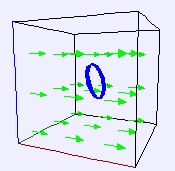
Faraday Loop Model
The EJS Faraday Loop Model
shows a
conducting loop in a time-dependent constant magnetic field. The model
is initially incomplete and
students must complete the model (by adding the appropriate equations).
Ejs
must be installed to
complete the model. Information
about EJS is available at:
<http://www.um.es/fem/Ejs/>
and in the OSP ComPADRE collection <http://www.compadre.org/OSP/>.
Exercises:
- Run the simulation. Notice
that you get a plot of the external magnetic field as a function of
time, the plot of the emf (red line) is constant. This is
because Faraday's Law has not been programmed into the model. What do
each of the buttons and sliders do? Measure the period of oscillation.
Which button or slider is related to this? What is the relation?
- In order to calculate the
induced emf in the loop due to the changing magnetic field, what do you
want the simulation to calculate? How should it depend on the
parameters "r" and "angle" controlled by the sliders below the picture
of the loop and the field?
- Right-click on the
simulation and Open
EJS Model.
Look at the Evolution
page. Right now, the evolution page is
simply:*
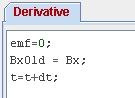
The
Evolution
page is labeled Derivative
because the emf
is found by
calculating the time derivative of the magnetic flux:
emf
= d(
B•
A)/dt
You are going to have EJS
calculate the derivative by calculating:
emf
= A•(ΔB/Δt)
for
small time steps. Explain (in words, not equations) what
ΔB is
and how you could find it if you were given the following
table of values of B as a function of time:
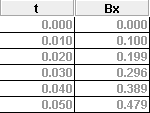
Your calculation of ΔB/Δt
at various times:
- One method for computing
ΔB/Δt
is to take the difference between the current value of B and the
previous value of B and divide by the time step. Think back to Calculus
I, what is the definition of a derivative? How is this similar to what
you learned as the definition of a derivative in Calculus I?
- You are going to use the
method described in the previous step for the Evolution
of the model. Notice that in the Evolution
page, because BxOld
is defined as Bx and
then the time is
increased using the expression t
= t + dt, BxOld
is indeed the previous
value of Bx. Therefore, using emf
= -(Bx-BxOld)/dt sets the emf
equal
to ΔB/Δt.
Why?
- Try inputing this code into
the Evolution
page and verify that it works
as expected. Does it calculate the derivative? Check that it
does the correct thing not only for sine waves, but square waves and
triangular waves.
- Once the model is working correctly, remove the message Incomplete Model
from the plot: from the Evolution
page set ModelComplete
= true (or simply remove the line ModelComplete=false).
- The
model, however, is not finished. You have not taken into
account the size of the loop (to calculate the area) or the angle
between the loop and the field. Include this as well in your
equation for the emf. (Note: To get a calculation of sin x,
you will
need to write the code as Math.sin(x).)
Your final equation for the emf:
emf =
________________________.
- Sketch
the output for a
triangle wave input and verify that the derivative is correct (check
the slope of the triangular wave and the height of the square wave).
- When the input is a square
wave, why does the output have "spikes"?
*For
those of you who have used the built-in ODE solvers in EJS before and
are wondering why you can not simply use that, an ODE solver does
a
numerical integration, not differentiation. Why?
References:
- Giancoli, Physics
for Scientists and Engineers,
4th
edition, Chapter 29
(2008).
Credits:
The Faraday Loop Model and
Exercises were created by Anne J Cox
using the Easy Java Simulations (EJS) authoring and modeling
tool.
You can examine and modify a
compiled EJS model if you run the
program by double clicking on the model's jar file.
Right-click
within the running program and select "Open EJS Model" from the pop-up
menu to copy the model's XML description into EJS. You must,
of
course, have EJS installed on your computer.
Information about EJS is
available at: <http://www.um.es/fem/Ejs/>
and in the OSP ComPADRE collection <http://www.compadre.org/OSP/>.