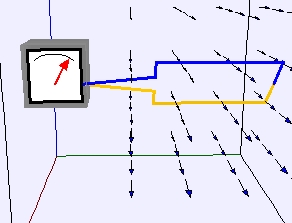
Generator Model
The EJS Generator Model
shows a
simple electric generator of a loop rotating in a uniform magnetic
field. A plot shows the current (in μA) and flux (in arbitrary
units). Users can examine and change the model if they have Ejs
installed.
Exercises:
- Run the simulation with
φ = 10*t. Why is this a loop rotating at a constant rate? What is
the angular speed of the loop? The
arrow on the gray box represents an ammeter, measuring the current in
the loop. Record the relation of the loop to the magnetic field when
the current is at its maximum/minimum values as well as when the
current is zero (in the middle of the ammeter).
- Observe the ammeter. When it
deflects to the right (positive),
what direction is the current flowing
through the loop (from the blue to the orange or vice versa)? Explain.
- If the resistance of the
loop is 1Ω, its dimensions are 60 cm2,
and the current on the plot is measured μAmps,
what is the value of the magnetic field (the angle φ is measured in
radians and time is measured in seconds)? Notice that on the plot, the
current has units of μA but the flux is in arbitrary
units
(A.U.). Hint: You may find it easier
to take data from the plot by opening DataTool
(click on the Wrench
button) and then clicking the Coordinates
check-box. If you want to
measure points on the second curve in the window, simply look at the DataTable
to the right of the plot and drag the third column in place
of the second one (so it is now the active one on the plot).
- Input a different function for φ(t). Explain what happens and
why.
References:
- Giancoli, Physics
for Scientists and Engineers,
4th
edition, Chapter 29
(2008).
- Hecht, Physics,
2nd edition, Chapter 20 (2000).
Credits:
The Generator
Model was created by Anne J Cox and Wolfgang Christian
using the Easy Java Simulations (EJS) authoring and modeling
tool.
You can examine and modify a
compiled EJS model if you run the
program by double clicking on the model's jar file.
Right-click
within the running program and select "Open EJS Model" from the pop-up
menu to copy the model's XML description into EJS. You must,
of
course, have EJS installed on your computer.
Information about EJS is
available at: <http://www.um.es/fem/Ejs/>
and in the OSP ComPADRE collection <http://www.compadre.org/OSP/>.