Pendulum
created by two current carrying wires.
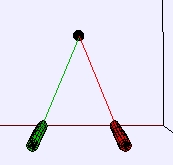
Current Wire Pendulum Model
The EJS Current Wire
Pendulum models
the force between two current carrying wires suspended from a support
to create two linked pendula. The current in each wire and the angle
between each pendulum and the vertical can be changed and the motion
can be damped. Users can examine and edit the model if Ejs is
installed. Information
about EJS is available at:
<http://www.um.es/fem/Ejs/>.
Questions:
- Run the simulation. You can click-drag
in the the window to rotate the view and shift-click
to zoom in and out. The color-coded sliders control the
current (in Amps) in each long wire. When the simulation is paused, you
can change the initial angle for each wire (angle is measured from the
vertical). The v=0
button damps the motion. Does the current flow in the same direction in
both wires? Explain.
- Reset the simulation. What
is the equilibrium position of the wires when the current is 200 A in
each?
- If the current is not the
same in each wire, what does the equilibrium position look like? It is
possible to determine (without the color coding), which current you are
adjusting? Why or why not?
- The line connecting each
wire to the central support is 1 m. What is the mass/length of each
wire (it is the same for both).
- What would be different if
the mass/length were different for each wire?
- Optional:
If you have EJS installated, change the simulation so that each wire
has a different mass/length (Note: Uses an array).
References:
- Halliday, Resnick and Walker,
Fundamentals of Physics,
8th
edition, Chapter 29
(2007).
Credits:
The Current Wire Pendulum Model
was
created by Anne J Cox
using the Easy Java Simulations (EJS) authoring and modeling
tool.
You
can examine and modify a
compiled EJS model if you run the
program by double clicking on the model's jar file.
Right-click
within the running program and select "Open EJS Model" from the pop-up
menu to copy the model's XML description into EJS. You must,
of
course, have EJS installed on your computer.
Information
about EJS is
available at: <http://www.um.es/fem/Ejs/>
and in the OSP ComPADRE collection <http://www.compadre.org/OSP/>.